



 Current Fire Protection Settings
- Due to area fire restrictions, MPE's entire system is on high sensitivity settings
Fire Mitigation System Settings
Beginning April 1, some of MPE's system settings will be adjusted to fire protection settings, a higher sensitivity system setting to reduce the risk of contact to a power line sparking and igniting a fire. Settings will further be adjusted when areas are designated a high fire risk by county officials and when there is a Red Flag Warning issued by the National Weather Service.
Video Explaining Fire Protection Settings
"I know how challenging and frustrating power outages can be. At MPE, our responsibility to protect our community and the long-term reliability of our system must come before convenience. This is why I ask that you all have patience with us this summer as we operate our system with wildfire prevention as our top priority," said MPE CEO Virginia Harman. "To keep your family, my family, and our communities safe as we face this season together."
At MPE, safety is our top priority, and these settings help protect our families, homes, and businesses. Find out more in the FAQs below.
What Mountain Parks is doing to protect our communities.
FIRE PROTECTION SETTINGS
WILDFIRE PREVENTION IS THE TOP PRIORITY: Mountain Parks Electric’s approach focuses on targeted, higher sensitivity fire protection settings, not widespread, long duration shutoffs. While outages can still occur, this strategy helps reduce wildfire risk without shutting off power to large areas for days at a time.
In preparation for a potentially severe wildfire season, MPE has been working for months on proactive steps to reduce wildfire risk and strengthen system reliability. Just as was necessary last year, MPE will again place portions of our system into higher sensitivity protection settings whenever an area is under fire restrictions set by local county officials, or when the National Weather Service issues a Red Flag Warning.
Public Safety Power Shutoff (PSPS) may be used when emergency responders or MPE crews require it to work effectively and safely in an emergency situation. Proactive power shutoffs may also be necessary if weather and drought conditions reach a heightened risk level. When system adjustments are required, either through higher sensitivity protection settings or PSPS, MPE communicates to members as early as possible.
WHY THE POWER GOES OUT WHEN FIRE RISK IS HIGH: During dry, high-risk conditions, MPE adjusts the way our system operates. When counties issue fire restrictions, we switch parts of the system into Fire Protection Settings, known as “one shot.”
On Red Flag Warning days, the system is switched to the most sensitive setting, “hot line tag.” If anything contacts a power line, the line shuts off immediately, rather than attempting to re-energize as it would do on normal settings, to reduce the chance of a spark.
TECHNOLOGY KEEPS OUTAGES CONTAINED: Additional protective equipment throughout the system helps isolate problems to smaller areas. Better monitoring technology lets us see what’s happening on the lines in real time and respond faster.
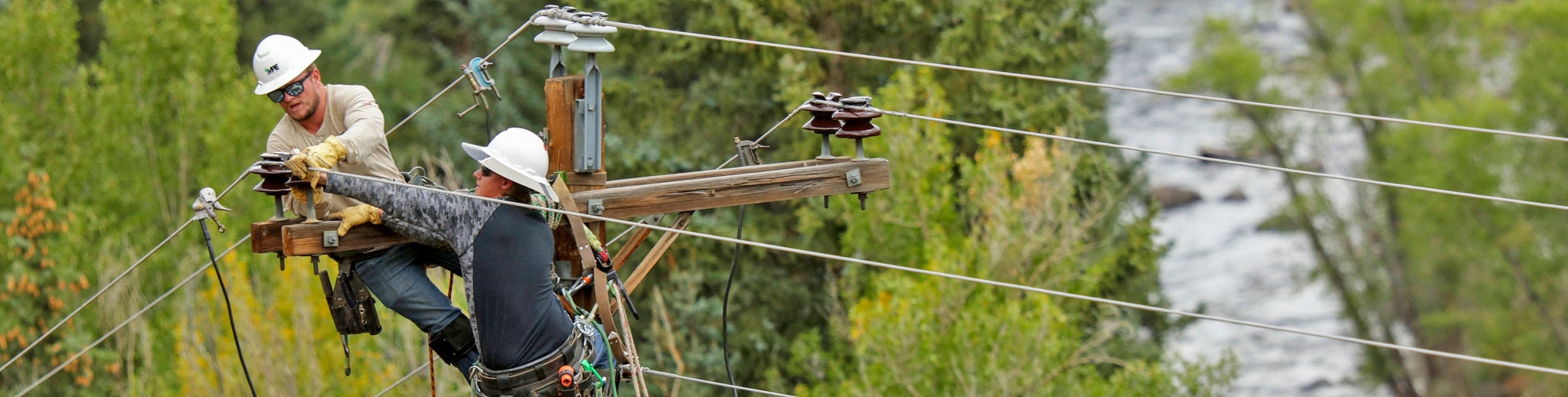
PREVENTING PROBLEMS BEFORE FIRE SEASON STARTS
MPE’s commitment to safety and reliability includes processes and major grant-funded projects that reduce the chances of outages, not just during wildfire season.
- Tree trimming on a four-year cycle. Every part of our system gets reviewed every four years to keep vegetation away from power lines.
- Drone-based inspections. In 2025, more than 98% of our overhead system was inspected by professional drones, catching problems early.
SMOKE DETECTION CAMERAS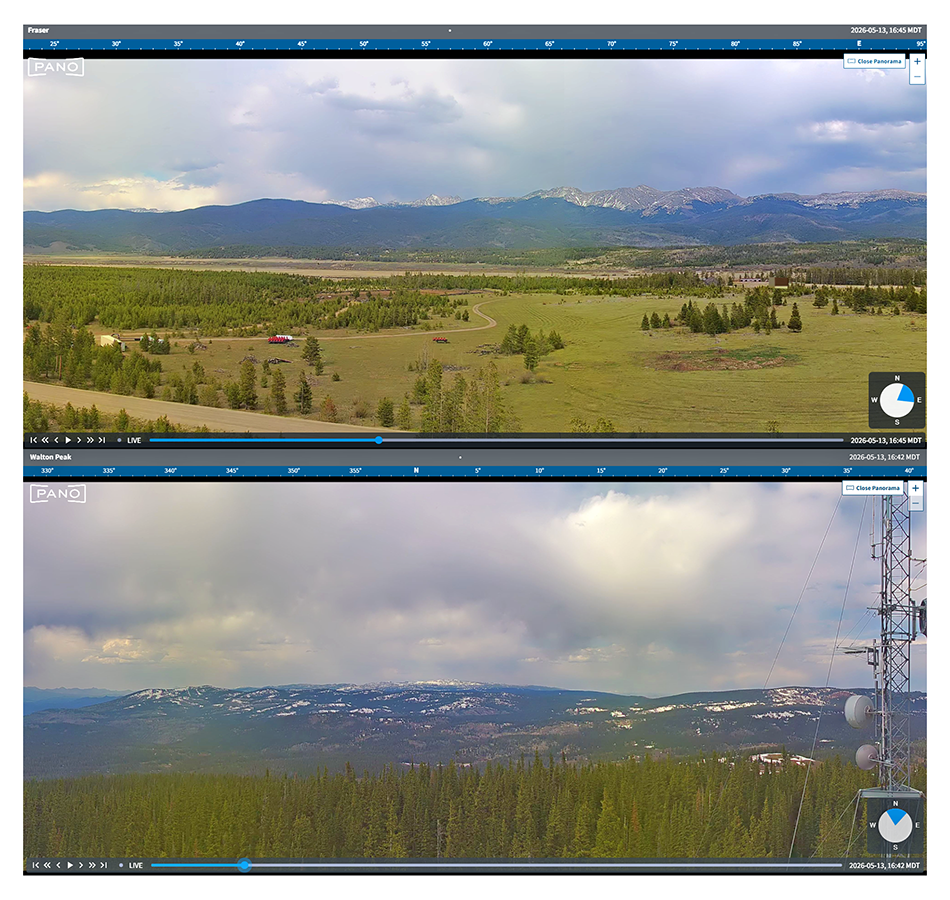
Smoke detection cameras help us spot potential wildfires early and alert first responders faster. Direct coordination with firefighters keeps crews safe during active fire events.
The Fraser Pano camera went live on March 23, joining MPE’s first Pano camera located on Walton Peak, which has been operational since September 2025. Together, the two cameras strengthen situational awareness in areas with elevated wildfire risk and help first responders detect potential fires earlier—often before a 911 call is made.
SmartHub Alerts
Stay informed during outages by signing up for alerts through SmartHub. You can receive alerts by text message, phone call, and/or email You’ll receive an alert when an outage begins at your service address and when power is restored. 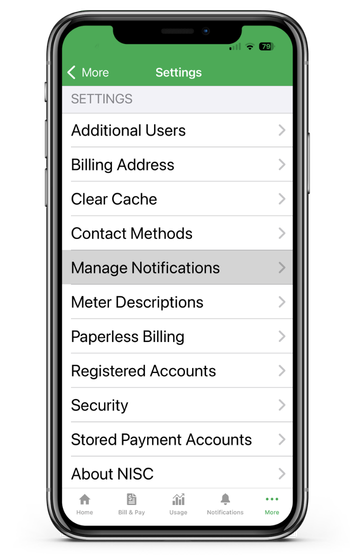
-
Log in to SmartHub at mpei.com/SmartHub or on the SmartHub App: If you haven’t registered yet, choose “New User” and follow the prompts to create your account. You will need your current electric account number, name or service address.
-
Go to Your Account Settings: Once logged in: Select “My Account” (or the "More" menu in the app) Choose “Settings,” then “Manage Notifications”
-
Choose How You Want to Receive Outage Alerts: Select “Service,” then scroll down to “Power Outage Options,” then choose how you want to be notified (you may select more than one option)
-
Use the account selector at the top of the screen to select the Correct Account (If You Have More Than One)
-
Save Your Settings: Save or confirm your notification preferences.
You’re all set! SmartHub will now send you alerts when an outage begins at your service address and when power is restored.
Need Help? MPE Member Services is happy to help you: Call 970‑887‑3378, ext. 3, or stop by the office during business hours. To update your contact information, please reach out to Member Services.
Emergency Alerts
Counties within MPE's service territory have emergency alert systems residents and visitors can sign up for online.
Grand County Alerts is a state-of-the art emergency notification system that replaces the former CodeRED system and represents a significant upgrade in emergency communications. To register, click on "Register for Grand County Alerts." Grand County also has a Specific Needs Registry–a database containing information about individuals who may require assistance in the event of a disaster. Contact Abbie Baker at 970-725-3288 for more information.
Jackson County wants to get every resident signed up for their alert system. To register or find out more information about Jackson County Alerts, visit www.nocoalert.org/jackson-county or call Samantha Martin at 970-723-4660 or the Sheriff’s Office at 970-723-4242.
The Office of Emergency Management and 911 Dispatch use Summit County Alert to send emergency notifications by phone, email and text to keep community members informed of emergency events.
Watch Duty App
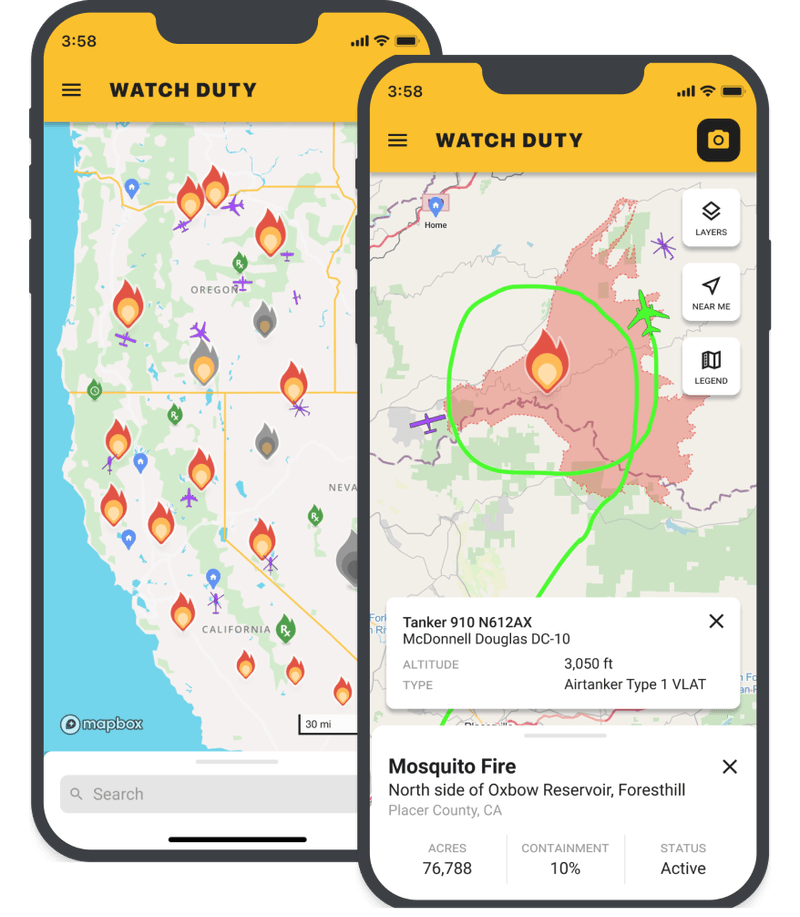
Watch Duty, a 501(c)(3) nonprofit, alerts you of nearby wildfires and firefighting efforts in real-time.
Wildfire Risk Property Assessments
Some area homeowners may be eligible for free Wildfire Risk Property Assessments through various fire agencies:
Grand County Wildfire Council and its Fire District partners provide wildfire risk assessments to property owners in Grand County as a free service. You can expect a roughly 45 minute walk through and discussion on general mitigation measures including; building materials, vegetation, fire behavior, forest health, & evacuation prepardness. Due to the nature of the assessment, property owners must be present. Assessments will be scheduled May-October as availability allows.
Summit Fire offers free, non-binding wildfire-preparation and property assessment to residents, property owners, homeowners' groups and civic organizations. These on-site visits cover issues such as landscaping and protecting your home from encroaching wildfires and ember storms, as well as personal preparation. To schedule yours, please call Summit Fire at (970) 262-5100 or complete the form at SummitFire.org.
Live Wildfire Ready
 Live Wildfire Ready is a statewide collaborative effort that shares simple, practical, low-cost actions residents can take to prepare their homes and property for wildfire. In addition to preparing one’s home, living wildfire-ready means being ready to evacuate during a fire. Inside, you’ll find great info on how to:
- Explore wildfire risk in your community
- Prepare your home and property for wildfire
- Be ready to evacuate in case of wildfire
Wildfire Evacuation Power Safety Checklist
If you’re asked to evacuate, your safety comes first. We know these moments are stressful and fast-moving. If you have time and it’s safe to do so, taking a few quick steps at your home may help reduce fire risk.
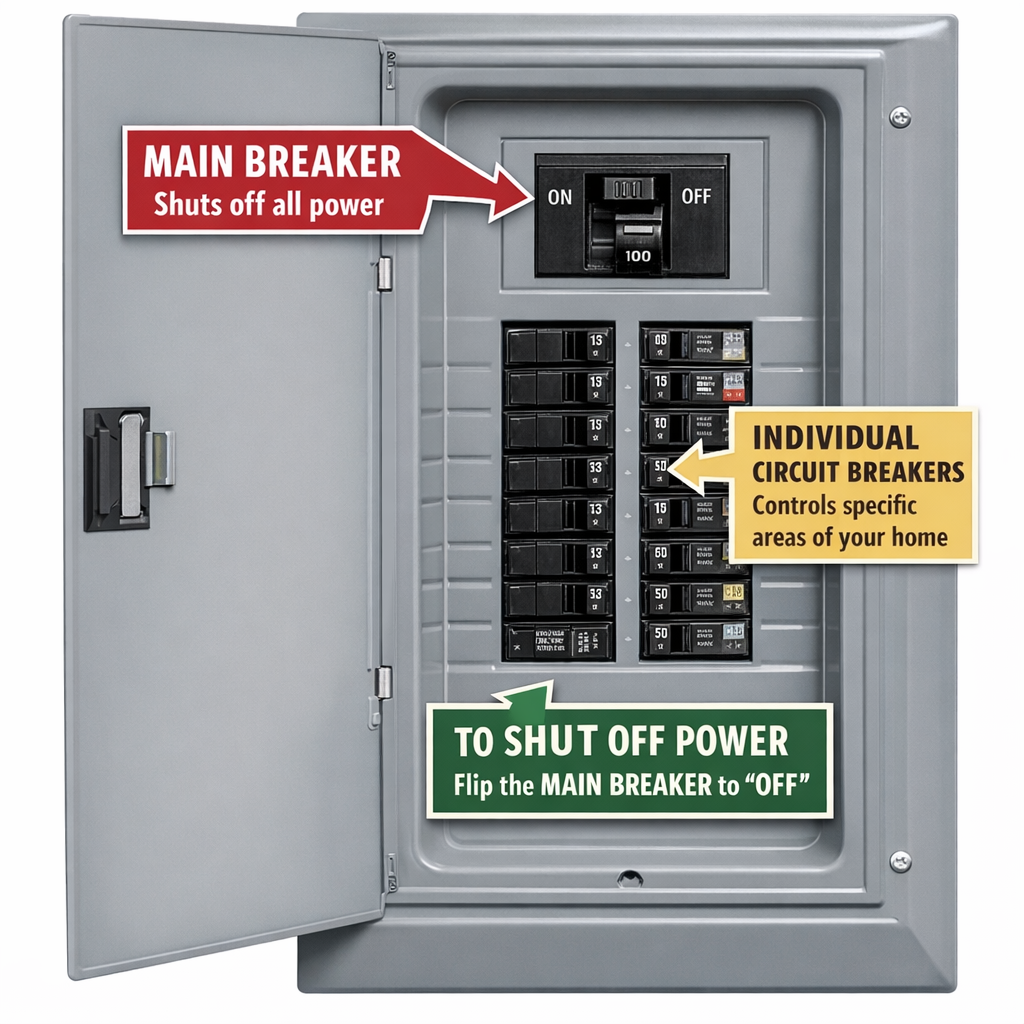 Before You Leave (If Time Allows)
- Turn OFF your main breaker
- This shuts off power to your entire home
- It may help reduce electrical sparks if lines are damaged
- Turn off or unplug major appliances
- Stoves, dryers, space heaters, etc.
- Close doors and windows
- Helps slow fire spread inside the home
- Leave immediately once instructed
- Do not delay evacuation to complete this checklist
Important Safety Notes
- Only turn off your breaker if you are familiar with your panel
- Do not touch damaged equipment or anything that appears unsafe
- Your safety matters more than property—leave first if unsure
After You Return
- Do not turn power back on if:
- Your home was damaged
- You see exposed wiring or smell burning
- If everything appears safe:
- Turn the main breaker back on
- Turn appliances on one at a time
- When in doubt, call a licensed electrician
Wildfire Season & Your Power – FAQs
We know how frustrating it can be when the power shuts off—especially when it happens unexpectedly during an already stressful wildfire season. Our members depend on electricity for homes, businesses, medical needs, and daily life. We don’t take outages lightly. Unfortunately, during periods of extreme wildfire danger, we sometimes have to choose between safety and reliability. At Mountain Parks Electric (MPE), safety must always come first.
During high wildfire risk, MPE intentionally operates parts of the electric system differently. When conditions are dry, windy, or dangerous, we place affected portions of the system into higher sensitivity fire protection settings. These settings are designed to shut power off quickly if something contacts a power line—such as a tree limb, debris, or wildlife—reducing the risk of sparks that could start a wildfire.
Higher sensitivity fire protection settings are protection modes used across the electric industry during elevated wildfire risk.
- When counties impose fire restrictions, MPE uses higher sensitivity fire protection settings, also known as "one shot."
- When the National Weather Service issues a Red Flag Warning, MPE may move to even higher sensitivity settings known as "hot line tag." These settings are sensitive enough that MPE also uses them to keep crews safe while working on energized lines. When a fault is detected, power shuts off almost instantly instead of trying to automatically re energize.
MPE adjusts system settings based on real time wildfire danger, including:
- Local fire restrictions
- Red Flag Warnings
- Weather conditions such as wind, heat, and dryness
When conditions improve, the system is returned to normal operating settings.
No. MPE’s approach focuses on targeted, higher sensitivity protection settings, not widespread, long duration shutoffs. While outages can still occur, this strategy helps reduce wildfire risk without shutting off power to large areas for days at a time.
PSPS may be used when emergency responders or MPE crews require it to work effectively and safely in an emergency situation. Proactive power shutoffs may also be necessary if weather and drought conditions reach a heightened risk level. When system adjustments are required, either through higher sensitivity protection settings or PSPS, MPE communicates to members as early as possible.
Our goal is always to keep the lights on. However, during extreme wildfire conditions, allowing the system to “ride through” faults can increase fire risk.
Sometimes, the safest power is no power.
As frustrating as outages are, a brief interruption is far less damaging than a wildfire that could threaten lives, homes, firefighters, and entire communities.
When higher sensitivity fire protection settings are active, linemen must physically patrol the affected line before power can be restored. This ensures the hazard has been fully cleared and that re energizing the line will not recreate the risk.
Because MPE’s service territory is large and rural, these patrols can take time—but they are critical for public and firefighter safety.
MPE continues to upgrade the system to limit outage impacts, including:
- Installing additional protective devices deeper into the distribution system so outages can be isolated to smaller areas
- Adding smarter equipment that can better detect and respond to faults
- Expanding remote monitoring and control so more of the system can be placed into fire safe modes quickly
These investments help reduce both wildfire risk and the number of members affected when outages occur.
Wildfire protection settings rely heavily on hands on field work. Linemen manually switch, verify, patrol, and coordinate protective devices across the system—often using multiple crews.
After outages, linemen work closely with engineers to fine tune settings so the system performs even better during future events.
MPE’s wildfire mitigation efforts include:
- System wide aerial inspections to identify and correct potential hazards
- Ongoing equipment upgrades that improve fault detection and isolation
- Expanded SCADA and remote control technology for faster response
- Targeted undergrounding in high risk areas as budgets or grant funding allow
- Enhanced vegetation management, including a transition from a 10 year trim cycle to a 4 year cycle to reduce vegetation contact with power lines
These efforts improve safety during wildfire season and enhance everyday reliability year round.
MPE already averages above 98% reliability annually, and in 2025, power was available 99.97% of the time for the average member.
Rebuilding or undergrounding large portions of the system would come at an astronomical cost, and as a member owned cooperative, those costs would ultimately be paid through electric rates. That’s why MPE prioritizes investments where they provide the greatest safety and reliability benefits.
MPE has invested in automated smoke detection camera systems in high risk areas. These tools help identify potential fires early and notify responders faster, improving response times and safety.
MPE works closely with first responders and transmission partners during wildfire events. In situations like the Windy Gap Fire, MPE coordinated to de energize infrastructure where necessary, protect firefighters, reroute power when possible, and restore service safely.
Members can stay informed by:
- Viewing the Outage Map at www.MPEI.com/Outages
- Signing up for outage alerts through SmartHub
- Following Mountain Parks Electric on Facebook for updates during major events
Our goal is to reduce uncertainty and keep members informed when difficult decisions must be made.
Helpful steps include:
- Keeping phones and battery packs charged
- Having flashlights available
- Planning ahead for medical or mobility needs
- Keeping refrigerator and freezer doors closed during outages
- Signing up for outage alerts through SmartHub
Generators can be helpful if used correctly. Never plug a generator directly into a wall outlet. The safest option is a professionally installed transfer switch. Always operate generators outdoors and follow carbon monoxide safety guidelines to protect your household and lineworkers.
Members can help by:
- Maintaining defensible space and managing vegetation on their property
- Reporting damaged or sagging power lines immediately
- Avoiding spark producing activities during Red Flag conditions
- Calling 811 before you dig to prevent damage to underground utilities
- Even during extreme wildfire conditions, power availability remained very high
- Investments made for wildfire protection also improve everyday reliability